Invoice app for contractors
An invoice app that has the invoice ready when the job is done.
The work is done. Getting paid shouldn't wait until Sunday night. Vesaya drafts the invoice when the job's done: you approve, and it goes.
The short answer
Vesaya is an invoice app for contractors that you run by talking. When a job is done, the invoice is ready for your OK. It goes out with a pay link from your own Square and marks itself paid when the customer pays. Zelle, cash and check you record by voice, and late invoices come back to you each morning with the reminder drafted. $119 a month for you plus any 2 seats (crew or office), $25 a month for each seat after that.
Your day
From done to paid
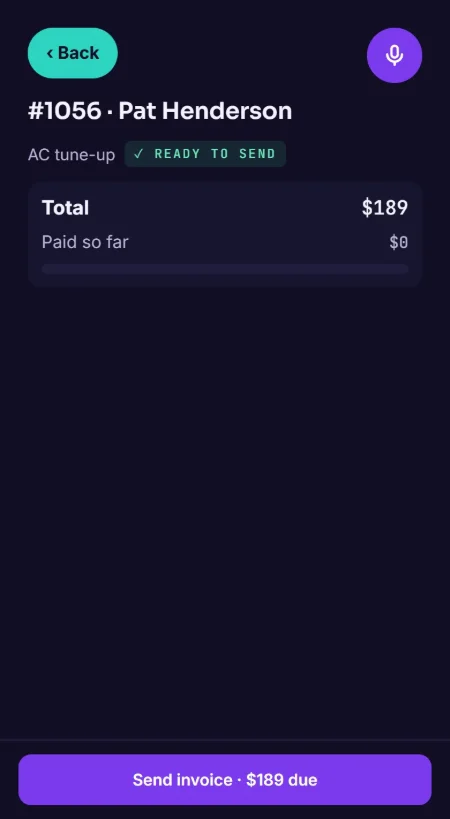
The job's done
Your crew taps Done, and the invoice is ready for your OK, built from the estimate the customer approved.
It goes with a pay link
Say yes and it goes out with a pay link from your own Square. When the customer pays, it marks itself paid.
Paid another way
"Ben paid 500 by Zelle." She records it against the invoice. Cash and check work the same way.
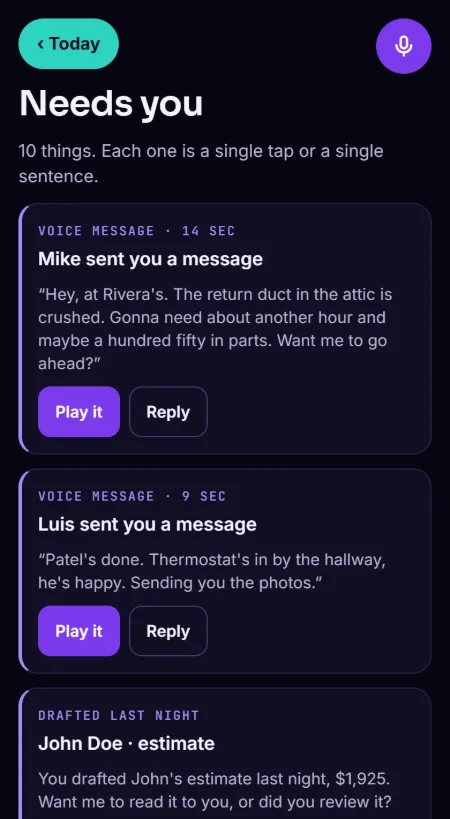
The late ones
Each morning she brings you the invoices that are past due, reminder already drafted. Say yes and it goes.
What you say to her
How it works
You talk. She drafts. You approve.
01
You talk
Tap the mic and say it the way you'd tell an office manager.
02
She drafts
The customer, the estimate, the invoice, the job text, the reminder.
03
You approve
Money is read back in full. Nothing goes to a customer until you say so.
Your Square, your money
Connect your Square account once. Invoices go out with its pay link and the money goes straight to your account. QuickBooks and Stripe are coming soon.
Deposits and balances
Book a job and she drafts the deposit invoice. When the work is done, the balance invoice is ready, with the deposit already taken off.
Payment terms that chase themselves
Set your payment terms and Vesaya checks every invoice in the background. When one turns late, it lands in your morning brief with the reminder drafted.
Questions
Straight answers.
Which payment processors work with it?
Square today: invoices go out with its pay link and mark themselves paid. QuickBooks and Stripe are coming soon. You can add Zelle to the invoice too.
Do reminders go out automatically?
No. She drafts the reminder and brings it to you; it goes when you say yes.
How do I get paid?
When a job is done, the invoice is ready for your OK. It goes out with a pay link from your own Square and marks itself paid when the customer pays. QuickBooks and Stripe are coming soon. Take Zelle, cash or check? Tell her ("Ben paid 500 by Zelle") and she records it.
Can I bring my customers over from another app or a spreadsheet?
Yes. Send us your customer export (most software can make a spreadsheet) and we move your customers and open jobs over for you. You don't retype anything.
What does it cost?
$119 a month for you plus any 2 seats (crew or office), $25 a month for each seat after that. No setup fee, no contract, cancel any time. Every price is on the pricing page.
Open Beta
Stop doing the office at night.
Vesaya is in Open Beta. Start free until launch day, Nov 2, no card.
Free to try. Cancel any time.
Try it now, no sign-up → vesaya.app/try, the real app on sample jobs